
Craft Anything · study · build · check
First-time Craft Anything setup
Install is done when the app opens. Setup is the short list that makes the first project possible: doctor, a coding agent, a mode, and a folder.
Not affiliated with the ArtCraft team or the Craft Anything maintainers. We do not host installers. Downloads go to GitHub Releases. Use the software only on targets you are allowed to examine.
Install path
Open the app or run doctor
From a source or CLI install, craft-anything-cli doctor checks the install, coding agents, and engines. Read what it says is missing before you start a build.
Sign in the coding agent
Building needs an agent on this computer. Claude Code is the one the project says works today: Craft Anything runs your own claude program and does not see that account. GitHub Copilot uses its own copilot login. Other agents are partial until doctor and the status doc say otherwise.
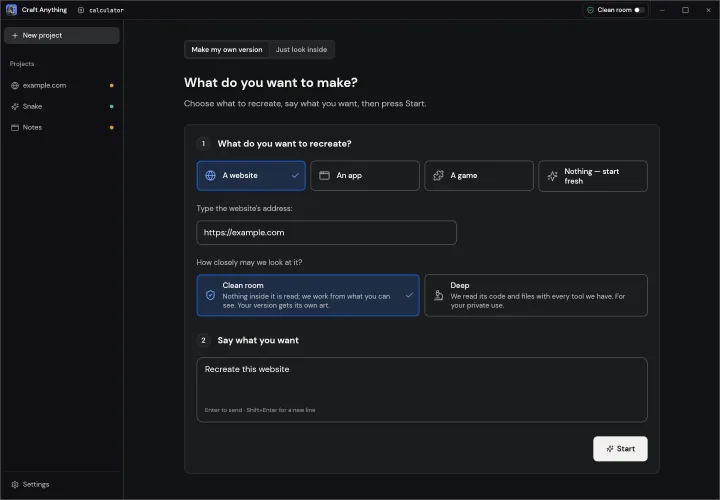
Leave Clean room on
The title bar or Settings switches modes. Clean room is the default. Turn on Deep only for a target you are allowed to inspect internally. The CLI flags are --clean-room and --deep for a single run.
Start a project
In Simple mode, pick a website, app, or game, describe what you want, and press Start. Projects land in Documents/Craft Anything unless you choose another folder. Each project keeps craft.json, capture, the generated app, checks, and an inbox for questions.
What the four steps are asking you to do
Study looks at the target and keeps evidence. Build hands a new project to the coding agent, in the stack you named or a default. Check compares the result with the original and lists gaps. Ready lets you open the result or type a change. The app asks in plain language when a decision is yours, including commands it has not seen in that project yet. Approving “always allow” for a package manager lets later commands of that kind run without asking, so do that only for dependencies you trust. npm can skip install scripts with npm install --ignore-scripts if you want that extra stop.
Inspection without building
You can open a target for questions without creating a project. The project calls this “Just look inside,” and it uses Deep mode. No AI account is required to inspect. Building is the step that needs the agent. Questions and analysis can also use API keys or a local OpenAI-compatible server under Settings → AI; those keys stay in your settings, not on this website.
Responsible use
Use Craft Anything on software you own or are allowed to examine. The project states that it does not bypass DRM, logins, or anti-cheat, and that rebuilds are told not to copy logos, photos, or text unless you confirm you have the rights. This guide will not accept target files, account tokens, or a request to walk through someone else’s protected program.
This site is not official. We do not host installers. Downloads go to GitHub Releases for storytold/craft-anything. Examine only software you own or are allowed to examine.
Doctor, agents, and local models
Run craft-anything-cli doctor after the window opens if you have the CLI. The report lists agents and engines the install can see. A missing Claude Code entry means sign in that tool on this computer, then run doctor again. GitHub Copilot has its own login. Other agents stay experimental until STATUS.md says otherwise. Settings → AI can point at API keys or an OpenAI-compatible local server for questions and analysis; those keys never leave this machine through craftanything.online. A process sitting on the model port that does not list models is not an agent. Update the desktop app if an npm-installed agent fails PATH checks on Windows; that class of bug was fixed in later tags. Approving “always allow” for a package manager is a trust choice you make per project, not a global install option. npm install --ignore-scripts is available when you want install scripts skipped. Continue an existing folder when a build stopped mid-way; deleting the project throws away captures you already paid to collect.
Simple mode, Advanced, and the project folder
Simple mode is the four-step loop. Advanced is the workbench on the same engine. Switching windows does not change Clean room versus Deep. Projects default to Documents/Craft Anything. Each project holds craft.json, captures, the generated app, checks, and an inbox. You can continue a half-finished build in that folder instead of starting over. Removing a folder from the recents list does not delete disk files. Pick a target you may examine, describe the outcome in plain language, and press Start only after doctor is clean enough for the work you want. If you only wanted questions, stop after Study or use “Just look inside.”
FAQ
- Doctor says Craft Anything has no coding agent.
- Install and sign in Claude Code, or another agent the status doc lists as working. Then run doctor again. The guide cannot sign in for you.
- Where do projects go?
- Documents/Craft Anything by default. Settings → General changes the folder and can list projects from other folders. Removing a folder from the list does not delete it.
- Can I continue a half-finished Craft Anything build?
- Yes. The app and the CLI can continue in an existing project folder instead of starting over. See the release notes if an older build ignored that.
- Do I have to use Deep mode on the first project?
- No. Leave Clean room on until you know you may inspect internals and you need them.